How do I structure my Runbook?
Last updated: April 23, 2026
Runbooks effectively allow you to define a procedure for an AI Agent to follow. We've put together some tips for how to properly structure a Runbook in this doc.
Not only is it a skill to write an effective Runbook, it's also a skill to identify what scenarios they'll be useful in! Reach out to the Pylon team to brainstorm which of your workflows could benefit from Runbooks.
Execution Flow
Steps in a Runbook are executed sequentially, one at a time
Only one Runbook can be active and executing at a time
Runbooks will automatically abort if the agent gets stuck after 10 attempts
After a Runbook completes, the agent returns to normal operation mode and can continue to deflect or answer additional questions
Step Structure
Each step in a Runbook is sandboxed, meaning they operate independently. Information is passed between steps using variables. If you have related questions or tasks, they should be grouped within a single step to maintain context.
Section 1: When should the Runbook be used?
There are two types of conditions to set:
Define explicit data properties about the account or contact that must be true in order for the Runbook to execute. You can filter by any normal Account Filter, whether it comes from your synced CRM or a Custom Field in Pylon.
Define in natural language the conditions that need to be met contextually for the Runbook to be applicable.
DO include semantic clues related to what the user might be asking about
DO phrase your condition as "When ..."
DON'T include too many unrelated conditions or branching scenarios (to handle this, you'd want to instead create multiple Runbooks each with their own scenario to address)
DON'T include references to data properties on the contact/account/etc, save these for the next step.
Examples:
"When a user is reporting an error related to a hardware failure"
"When a customer asks a question about their subscription, how to cancel, getting a refund, getting access to their invoices, or changing their credit card or payment details"
"When a customer asks a vague or unclear question"
Section 2: Outline Runbook Steps
Use explicit actions and natural language to define the steps that should be taken by the AI as part of the Runbook. Check out the full list of possible built-in actions here.
Important Limitations
Runbooks do not have access to training data or knowledge base content. When AI agents execute Runbooks, they cannot:
Reference or cite knowledge base articles
Provide links to documentation
Access any training data sources
Avoid including instructions that ask the AI to:
"Provide links to relevant knowledge base articles"
"Reference our documentation"
"Share helpful resources from our knowledge base"
These types of instructions will cause the AI to hallucinate non-existent links or make up documentation references. If you need to provide customers with specific links or knowledge base references, either:
Include the exact links directly in your Runbook steps using quotes
Use a separate AI agent (not executing a Runbook) that has access to training data
Handle knowledge base queries outside of Runbooks
Important: Action Ordering for Escalation: When your Runbook needs to both respond to a customer and escalate/reassign the issue, always place the external message action before the reassignment action. Once reassignment occurs, the AI agent loses access to continue executing the Runbook.
General Tips
Read through our FAQ Docs to better understand how and where Runbooks should be used:
Use specific, action-oriented language and leave as few things to the AI's imagination that are important. For example, if an ID you are requesting from the customer must be in a certain format, be explicit about what this format should be.
When asking the AI to reply to the user, to get an exact match enclose your phrasing in "quotes"
You can also use quotes to force exact matches for responses from customers, as in some of the examples below
Each numbered step in a Runbook is self-contained. This means you should pass variables explicitly between steps when needed and/or can set up multiple conditions for a Runbook to check one after the other that are not necessarily dependent on order.
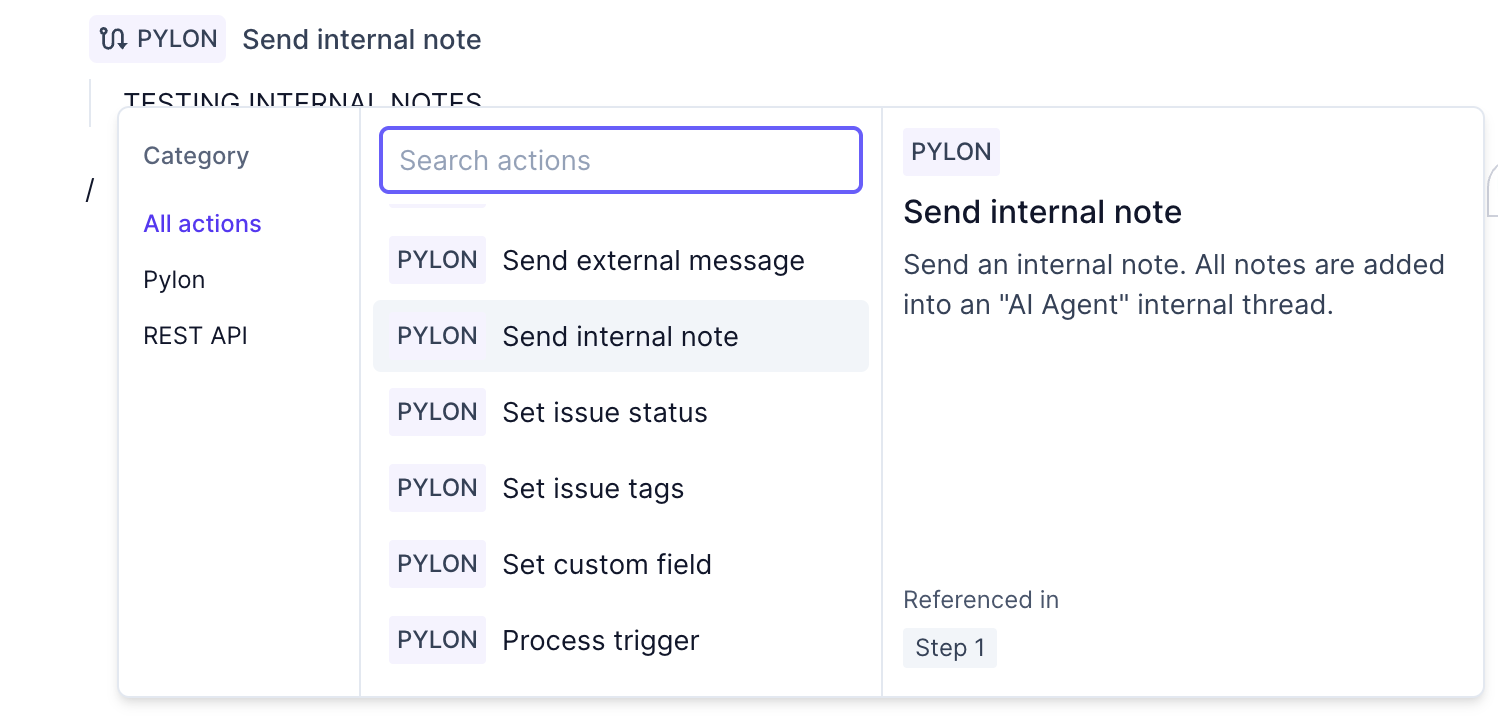
Don't overthink: Write your first draft however it feels natural and then iterate to add in more explicit Actions and Variables (
/and{{ }}) wherever possible. Some examples would be:Handle ambiguous inputs explicitly: When your Runbook expects specific information from users (like IDs, emails, or other data), anticipate cases where users might provide multiple options or unclear responses. Include explicit instructions for the AI on how to handle these scenarios. For example, if requesting a UUID and the user provides multiple ones, instruct the AI: "If there are multiple UUIDs, pick the most relevant UUID or default to the first UUID." This prevents the Runbook from getting stuck when faced with ambiguous user responses.
Tip: Use the Hint Module to teach you about the actions and variables, and reference where the Runbook is currently using the same functions
Troubleshooting: Steps Bunching Together
If you're experiencing an issue where your Runbook steps are "bunching into 1" instead of being properly separated:
Click to the bottom of the Runbook
Press Enter to make the second step appear
Copy and paste or drag blocks to the new steps as needed
This UI issue can sometimes prevent proper step separation, but this workaround will help you organize your Runbook into the intended multiple steps.