Telegram Integration: Security Architecture & Data Protection
Last updated: April 6, 2026
Overview
This article is designed to give additional insights in how Pylon's Telegram integration works, what data is transmitted and stored, how credentials are protected, and what third-party audits cover this integration.
If you're looking for step-by-step setup instructions, see our Telegram Setup Guide.
1. Integration Architecture
The Pylon <> Telegram integration is built on two complementary protocols, each secured independently.
a) Telegram Bot API — Primary Message Ingestion
When you create a Telegram bot via BotFather (see the setup guide) and connect it to Pylon, you provide the bot's API token. Pylon registers a webhook with Telegram so that every new message in your connected group chats is pushed directly to Pylon's servers over HTTPS.
Key components of this setup:
BotFather API token: The unique credential that identifies your bot to Telegram's servers. This is the only token you ever enter into Pylon. It is encrypted immediately upon receipt and is never stored or logged in plaintext (see Section 3 for full details on how it is protected).
Webhook secret token: Pylon automatically generates a cryptographically random secret token at setup time. Pylon rejects any request that does not match with an HTTP 401 — even before parsing the payload.
Group Privacy Mode: Telegram bots default to Privacy Mode, where they only receive direct messages or mentions. For Pylon to surface all messages from a support group, Privacy Mode must be disabled for that specific group. We recommend disabling group privacy only on channels explicitly linked to your Pylon workspace.
b) MTProto — Phone-Number Authentication
For certain features that require access beyond the Bot API (such as reading message history in pre-existing groups), Pylon uses Telegram's native MTProto protocol. This requires a one-time phone-number verification by a Pylon user with admin access to the relevant Telegram groups.
2. Data Flow
Here is a precise, step-by-step account of what happens from the moment a message is sent in Telegram to when it appears in Pylon:
Customer sends a message in a Telegram group chat linked to your Pylon workspace.
Telegram pushes the event to Pylon's webhook endpoint over HTTPS. Telegram's Bot API servers are the only systems that ever directly contact Pylon's integration endpoint.
Webhook validation: Pylon immediately validates the tenant. Any request that fails either check is rejected before any data is read or processed.
Support workflow: The message is linked to the appropriate Pylon contact and account, and surfaced in your support issue queue for your team to respond to.
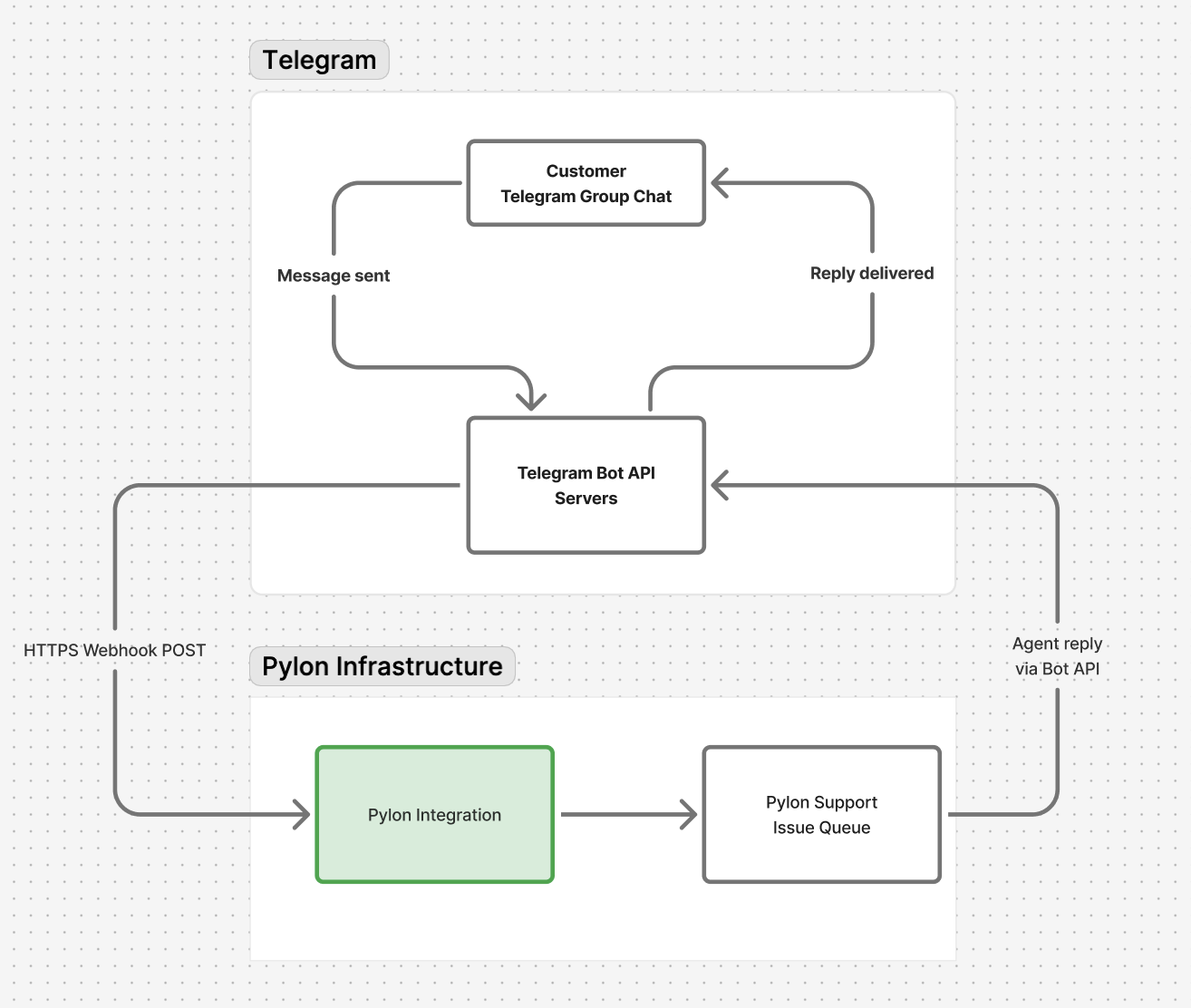
What Pylon doesn't store
Telegram user passwords in plain text
Any messages from Telegram groups that are not explicitly linked to your Pylon workspace
Full file content (only file metadata and Telegram-generated URLs are stored)
3. Authentication & Access Control
Every credential involved in the Telegram integration follows a consistent, defense-in-depth security model. Here is exactly how each one is handled.
BotFather API Token
The API token you obtain from BotFather is the master credential for your Telegram bot. Pylon handles it as follows:
Encrypted immediately and at rest, securely stored
Webhook Secret Token
This is a Pylon-generated credential — you never need to create or manage it yourself.
Cryptographically random, unique per organization, tenants are isolated. Encrypted immediately and at rest, securely stored
4. Audit & Compliance
Pylon is SOC 2 Type II certified and undergoes annual third-party security audits that include penetration testing. These audits cover the full Pylon platform, including all integrations and the credential management infrastructure described above.
Our compliance documentation, including the SOC 2 report, penetration test summaries, and security policies, can be shared upon request. If you need an NDA to access specific documents, please contact your account manager.
Read more here.
Frequently Asked Questions
Can Pylon read messages from Telegram groups I have not linked?
No. Pylon only receives events from Telegram for your specific bot. Your bot only exists in groups where it has been explicitly added. Pylon processes no data from any group that has not been linked in your workspace settings.
What happens if I rotate my BotFather API token?
If you regenerate your token in BotFather, you will need to re-enter the new token in Pylon's Telegram integration settings. The old token is immediately replaced in our database and the previous value is discarded.