How to manage and filter tickets from ticket forms
Last updated: May 13, 2026
When you use custom web-based ticket forms in Pylon, submitted forms automatically create new tickets in the system. This article explains how tickets are created and how to organize them effectively.
Automatic ticket creation
When a user submits a custom ticket form:
A new ticket is automatically created in Pylon
The requester receives a confirmation email
A message is sent to Pylon to create the new ticket
Organizing tickets from custom forms
To efficiently manage tickets created from specific forms, you can create custom views in Pylon. Here's how:
Create a new issues view
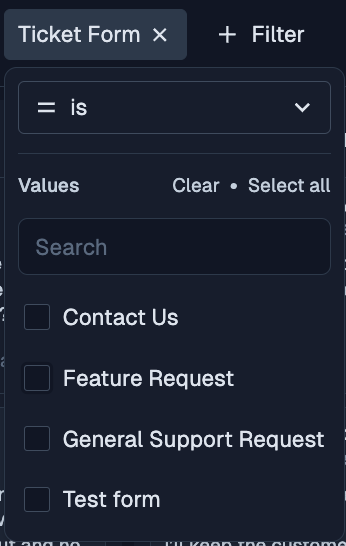
Add a filter for "Ticket Form"
Select the specific form you want to filter by and save
This process allows you to create a dedicated view for tickets submitted through a particular form.
Note: this only applies to web-based ticket forms. Slack ticket form submissions are handled differently and will not appear based on Ticket Form filters.
Additional tips
You can create multiple views for different forms if needed
Custom views help streamline your workflow by automatically organizing tickets based on their origin
Remember to name your views clearly for easy identification