How do I merge issues?
Last updated: July 17, 2026
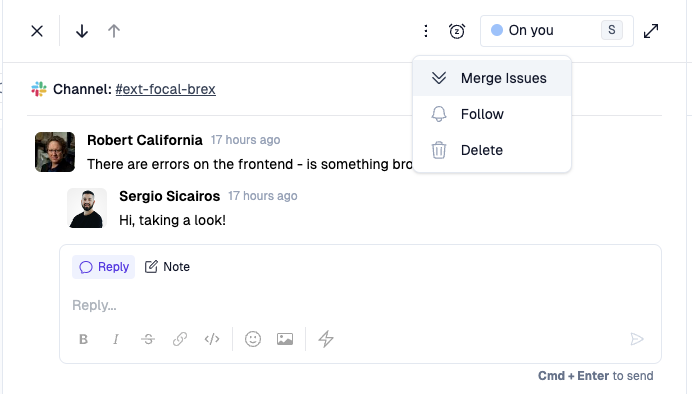
You can merge issues together from the issue detail page by clicking the 3-dot menu in the top right of the issue and selecting the merge option.
When you merge issues, you choose one issue to keep as the primary issue. Message history and threads from the duplicate issue are moved onto the primary issue, while the duplicate issue is removed.
Eligible issues can be merged across supported sources as long as they are associated with the same account.
The primary issue keeps its sidebar fields, such as tags, assignee, team, status, and other issue details.
The duplicate issue's messages and threads are preserved on the primary issue, but its sidebar fields are not copied over.
Issues vs Tickets
When you merge issues, all message history from both issues is preserved and combined. If the duplicate issue has multiple threads, Pylon keeps those threads separate on the primary issue so the conversation history remains clear.
Tickets can be customer-facing and may have ticket IDs that customers use to track status. Because of this, Pylon applies additional restrictions to prevent unintended consequences when merging tickets.
Which issue sources can be merged?
Eligible issues can be merged across supported sources, including Slack, Teams, Discord, Telegram, email, phone, SMS, WhatsApp, forms, and custom sources.
Issue sources/types | |
Can be merged | Eligible issues from supported sources, including Slack, Teams, Discord, Telegram, email, phone, SMS, WhatsApp, forms, and custom sources. |
Can't be merged | Issues from externally-linked support integrations, including Intercom, Zendesk, Freshdesk, Jira Service Management, HubSpot, and Salesforce, and in-app chat issues from the chat widget. |
Requirements and limitations
Account association: Issues must be associated with the same account to be merged. If issues do not have an account, they must have the same requester.
Message history: Message associations, issue threads, side conversations, personal email associations, and voice calls from the duplicate issue are reassigned or copied to the primary issue where supported.
Closing messages: If a closing message is provided during the merge, Pylon sends it for customer-facing duplicate issues from Slack or forms.
Issue Separation and Splitting
Pylon automatically threads related messages and separates different topics intelligently. However:
Single messages cannot be split: If a customer sends one message containing multiple issues, Pylon cannot automatically separate these into different issues.
Automatic threading: If a customer sends multiple separate messages on related topics, Pylon will thread the related ones together and separate unrelated topics.
Manual splitting: When an issue has multiple threads, you can split off a thread into its own issue by hovering over the first message of that thread and clicking the split action. For email issues, the split action is available on any message in the thread. Split is not available for SMS issues.
Multiple users: When different users from the same company ask questions on the same topic, Pylon can bundle later threads into the earlier one while keeping the original requester.